
Features
Build Your Entire Game Plan in One View
Rizzler's game planning tool puts your batting order, fielding rotation, and pitching assignments in a single drag-and-drop view. Build a complete game plan in about 10 minutes on your laptop, then execute it from your phone in the dugout. Every change you make ripples through the rest of the game automatically: move a player in the third inning and Rizzler adjusts innings four through six without you touching them.
How Game Planning Works
Most coaches plan games in pieces. Batting order on one sheet. Fielding rotation on another. Pitching plan in their head. Then they spend the game trying to keep all three aligned while also coaching.
Rizzler puts all three in one place and keeps them synchronized.
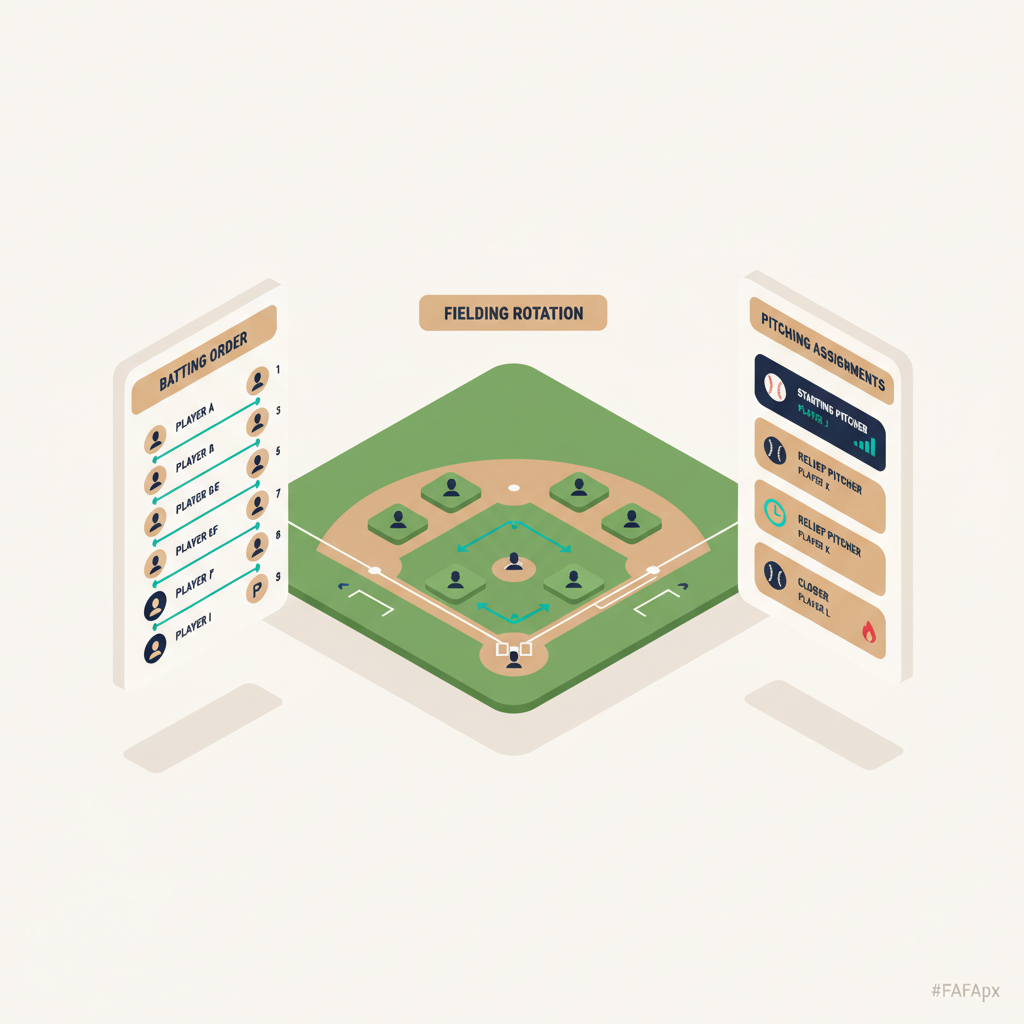
Batting order sits on the left side of the screen. Drag players into position or let the AI Batting Order generate one for you. Rizzler handles both a standard 9-player order and a continuous batting order.
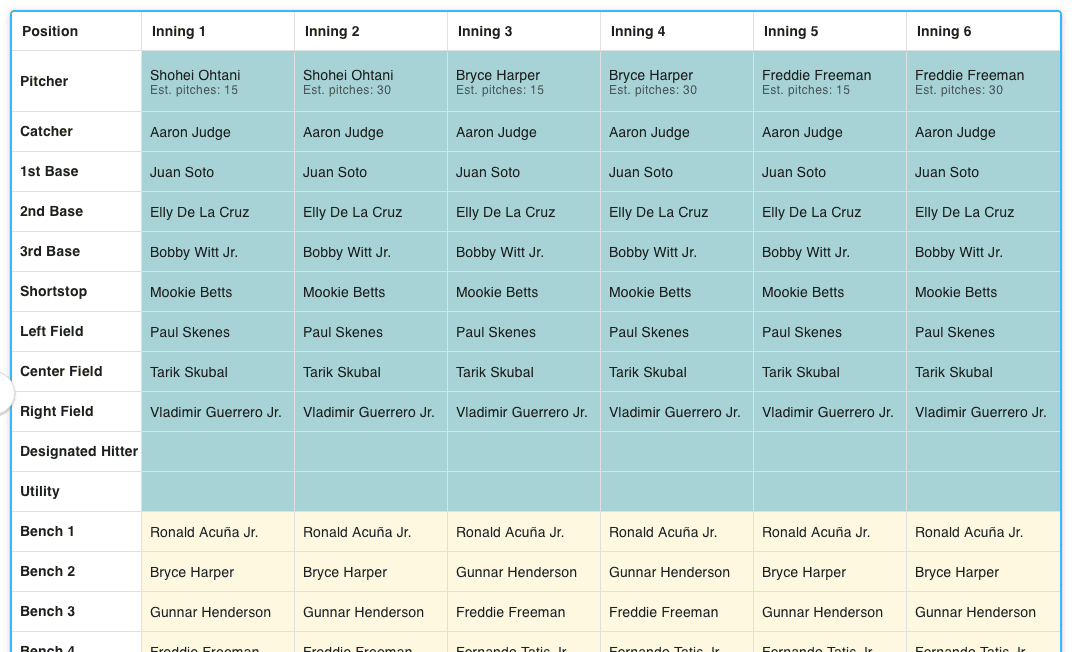
Fielding rotation fills the center: a grid of positions (pitcher, catcher, 1B, 2B, SS, 3B, LF, CF, RF) by innings. Drag players into position slots. Rizzler highlights conflicts: if you put a player at pitcher who doesn't have enough rest days, you'll see a warning before you save. Need help? AI Fielding Positions builds the rotation for you on the Coach plan.
Pitching assignments sit on the right. Assign your starter, set a target pitch count, and designate your relief options. Rizzler shows each pitcher's current rest status and flags anyone who's ineligible based on league rules.
When you change something, whether it's a player, a position, or an inning, Rizzler recalculates every downstream inning. Move your shortstop to pitcher in the fourth inning? Rizzler needs someone at shortstop for innings four through six. It suggests options based on who's available.
What Makes This Different
It's one view. Not three separate screens, not a spreadsheet with multiple tabs. One view where you see the whole game at once.
Changes cascade. Make an edit in inning three and innings four through six update automatically. This is the feature coaches say saves the most time, especially mid-game when plans change fast.
Rules are checked as you build. Rizzler knows your league's rules: pitch count limits, rest day requirements, minimum play, catcher-to-pitcher restrictions. It checks every decision against the rules and flags violations before you save.
It syncs to your phone. Save the plan on your laptop at 10 PM. Open the iOS app at the field the next morning. It's there. Make a change during the game and the web app updates too.
Game Planning on the Free Plan vs. Coach
| Capability | Free | Coach |
|---|---|---|
| Build batting order manually (drag-and-drop) | ✅ | ✅ |
| Build fielding rotation manually | ✅ | ✅ |
| Assign pitching plan | ✅ | ✅ |
| Rule compliance checking | ✅ | ✅ |
| Cascading edits | ✅ | ✅ |
| Sync between web app and iOS app | ✅ | ✅ |
| AI Batting Order (stats-based) | ✗ | ✅ |
| AI Fielding Positions | ✗ | ✅ |
| Tournament planning (multi-game) | ✗ | ✅ |
Game planning itself is fully available on the Free plan. The AI features that generate lineups for you require the Coach plan. Compare plans →
Who Uses Game Planning
Every coach. This is Rizzler's core feature. Whether you're a first-year rec league coach building your first-ever lineup or a travel ball veteran optimizing for a bracket game, game planning is where you start.
Little League coaches use it to stay organized and rule-compliant. Planning each game takes 10 minutes instead of an hour, and you never accidentally violate a pitch count or minimum play rule.
Travel coaches use it as their competitive planning cockpit. Combined with the AI features and tournament planning, every game has a data-informed plan before the first pitch.
League administrators benefit when every coach in the league uses Rizzler for game planning. It means every team has a plan, and playing time tracking works league-wide.
Frequently Asked Questions
How long does it take to build a game plan?
First time: about 15 minutes while you learn the interface. After that: 5-10 minutes per game. With AI on the Coach plan: under 2 minutes for the AI to generate, plus a few minutes for your adjustments.
Can I reuse a game plan from a previous game?
Yes. Duplicate a previous game plan and modify it for the next game. This is especially useful for coaches who run similar rotations each week.
Does it work for continuous batting order?
Yes. Set your league rules to continuous batting order and the game planning view adjusts. Your entire roster appears in the batting order, and the fielding rotation handles the defensive substitutions.
What happens when plans change mid-game?
Open the iOS app and make the change. Swap a fielder, pull a pitcher, add a sub. Rizzler adjusts every remaining inning automatically. This is the part that replaces frantically scribbling on a lineup card.
Is there a lineup card I can print?
Yes. Export your game plan to share digitally or print a physical lineup card for the plate meeting.
Game planning is the foundation of Rizzler, and it's fully available on the Free plan. Set up your roster and build your first plan tonight.
Rolling it out to a club or league, or want a walkthrough first? Our team can help.
Talk to our team
Want to spend more time coaching and less time with paperwork? Let's talk.
Tell us about your team and we'll show you how to plan games, set lineups, run the schedule, and develop players in one place, so you spend the season coaching instead of chasing admin.
Less admin, more coaching
Plan games, set lineups, and track the season in one place
Keep every family in the loop automatically
Tell us about your program
4 fields · takes 30 seconds
Lands in the same inbox as the Help button · human response only
Read Next
Tournament Planning for 13U-14U Baseball
BlogVolleyball Rotations: How They Work, All Systems Explained
VolleyballVolleyball Stats: Every Stat Explained, and What to Track
VolleyballLeague-Wide Rule Compliance for Little League
For LeaguesVolleyball Practice Plans: Ready-to-Run Sessions by Focus
VolleyballVolleyball Drills at Home: Solo Work That Actually Transfers
Volleyball