For Leagues
Run Evaluation Day Without the Clipboard Chaos
Evaluation day is the foundation of a fair draft. When it's run well (standardized scoring, multiple evaluators, consistent data), the draft produces balanced teams and fewer parent complaints. When it's run poorly (mismatched clipboards, inconsistent scoring, lost paper forms), the draft data is unreliable and the season starts on shaky ground.
Rizzler's Evaluation Events feature replaces the clipboards with phones, standardizes the scoring, and delivers draft-ready data before the coaches leave the field. Here's how to run it.

Before Evaluation Day
1. Build Your Rubric (2-4 Weeks Before)
Decide what you're evaluating and how. Most Little League evaluation days assess 4-6 skill areas:
| Skill | What to Look For | Scoring Scale |
|---|---|---|
| Hitting | Swing mechanics, contact quality, bat speed | 1-5 or 1-10 |
| Fielding | Glove work, footwork, throwing accuracy | 1-5 or 1-10 |
| Throwing | Arm strength, accuracy, mechanics | 1-5 or 1-10 |
| Speed | Sprint speed, first-step quickness | 1-5 or 1-10 |
| Baseball IQ | Awareness, hustle, coachability | 1-5 or 1-10 |
| Pitching (optional) | Command, velocity, composure | 1-5 or 1-10 |
Pick one scale and use it on every skill. We'd steer you to 1-10 for an evaluation day: it spreads a full division out so you get fewer ties to break at the draft table, and it normalizes to a percentage, which keeps scores comparable across age groups and from one year to the next. A 1-5 scale is fine if your coaches prefer it, and baseball or softball boards with scouting-minded volunteers sometimes run the 20-80 scale (50 is average) instead — just don't mix scales inside the same event.
In Rizzler, you build this rubric once and every evaluator uses it. Define what each score means: a "6" on a 1-10 scale should mean the same thing to every coach. This is the single most important step for data quality.
2. Set Up the Event in Rizzler
The league administrator creates the evaluation event in Rizzler:
- Set the date and time
- Add age groups/divisions
- Select or customize the rubric
- Register all players who will attend
- Invite evaluating coaches
3. Prepare Your Evaluators
Brief your coaches before evaluation day. Make sure everyone understands the rubric, the scoring scale, and the importance of independent evaluation (don't discuss scores with other coaches during the event). Every evaluator needs the Rizzler iOS app or web app on their phone.
During Evaluation Day
Station Setup
Organize the field into stations, one per skill area. Players rotate through stations in groups.
| Station | Location | Evaluator(s) |
|---|---|---|
| Hitting | Batting cage or home plate | 2-3 coaches |
| Fielding | Infield | 2-3 coaches |
| Throwing | Right field line | 1-2 coaches |
| Speed | First base to home | 1 coach with stopwatch |
| Baseball IQ | Baserunning drill | 1-2 coaches |
Multi-Evaluator Scoring
This is where Rizzler makes the biggest difference. At each station, 2-3 coaches evaluate the same players independently, each scoring on their own phone.
Why this matters: one coach might consistently score higher than another. One might have a bias toward players they coached last year. By averaging multiple independent scores, individual quirks wash out and the overall data is more accurate.
Rizzler averages the scores automatically. You don't need to do any math.
Measurables (Optional)
If your league tracks measurables (exit velocity, pitch speed, sprint times), record them during the appropriate station. Rizzler stores measurables alongside rubric scores so you can sort players by both subjective assessment and objective data.
After Evaluation Day
Review the Data
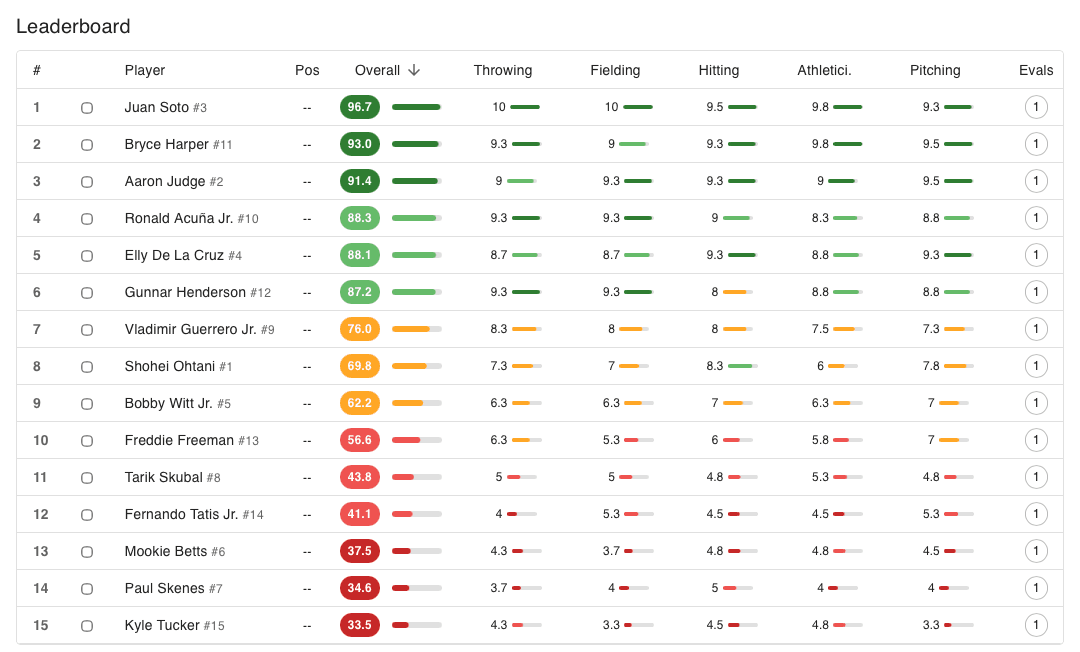
Open the Evaluation Events dashboard on the web app. You'll see:
- Every player sortable by overall score
- Scores broken down by skill category
- Scores from individual evaluators (with averages)
- Filters by age group/division
- Returning players flagged separately from new players
Prepare for the Draft
Sort players by overall score. Identify tiers: the clear top group, the solid middle, the developing players. Use the data to inform draft decisions, not dictate them. The numbers tell you who's skilled; your coaches' knowledge tells you about attitude, coachability, and fit.
The results stay viewable and sortable in the app, so you can pull them up during the draft itself, even if it happens weeks later.
Handle Parent Questions
When a parent asks "how did my kid do?" you have specific, data-backed answers: "He scored well in fielding and speed, and his hitting score suggests he'd benefit from batting cage work this spring." That's more useful, and more defensible, than "he did fine."
Why This Works Better Than Paper
| Rizzler Evaluation Events | Paper & Clipboards | |
|---|---|---|
| Same rubric for every evaluator | ✅ Automatic | Depends on whether you photocopied enough |
| Multiple evaluators, averaged scores | ✅ Automatic | Manual math after the event |
| Data available immediately | ✅ Real-time sync | Hours of transcription |
| Bias reduction | Averaged multi-evaluator scoring | Requires strict discipline |
| Draft-ready rankings | ✅ Sortable, filterable | Spreadsheet work |
| Year-over-year comparison | ✅ Historical tracking | Hope someone saved last year's papers |
Frequently Asked Questions
How many evaluators do we need?
At minimum, 2 evaluators per station for meaningful score averaging. Three is better. For a league with 100+ players across multiple age groups, plan for 8-12 evaluators total.
Can coaches evaluate players in their own division?
Yes, but consider having coaches evaluate divisions they won't be drafting from to reduce bias. Rizzler supports assigning evaluators to specific age groups.
What if it rains and we have to reschedule?
The event stays in Rizzler. Reschedule, and any scores already entered are preserved. If you split the evaluation across two days, the data accumulates.
Is this available on the Coach plan?
No. Evaluation Events require the Club plan. This is a league-wide organizational feature. Compare plans →
Evaluation day is the first step toward a fair season. See everything Rizzler offers leagues → · Evaluation Events feature →
Planning this year's evaluation day? Talk it through with our team before the clipboards come out.
Talk to our team
Running a league? Let's talk.
Tell us about your league and we'll show you how to bring every team up to one evaluation standard and see the whole picture from the organization dashboard, usually within one business day.
One evaluation standard across every team
Evaluation days and drafts with consistent, comparable scores
League-wide visibility in the organization dashboard
Tell us about your program
4 fields · takes 30 seconds
Lands in the same inbox as the Help button · human response only
Read Next
Rizzler for Baseball & Softball Coaches
For CoachesWhat is a Pitch Count in Baseball?
LearnHow to Run an Ice Hockey Tryout: A Coach's Step-by-Step Guide
LearnVolleyball Practice Plans: Ready-to-Run Sessions by Focus
VolleyballRule Compliance: Never Violate a Rule You Didn't Know Existed
FeaturesPitching Analytics: Track, Chart, and Develop Your Pitchers
Features